
1384 字
7 分钟
Git配置及常用命令
安装
安装方式多种多样,最常见的是 官网下载 和命令行安装。Winget 在 Windows10 和 Windows11 已经预装,是可以直接使用的包管理器。如想尝试更多 Windows 包管理器,可了解 Scoop 或 Chocolatey 。
# Winget
winget install --id Git.Git -e --source winget
# Scoop
scoop install git
# Chocolatey
choco install git -y
配置
配置用户信息
# 查看配置信息
git config --list
# 全局用户名
git config --global user.name "你的用户名"
# 全局邮箱
git config --global user.email "你的邮箱"
# 项目级用户名
git config --local user.name "项目专用用户名"
# 项目级邮箱
git config --local user.email "项目专用邮箱"
配置ssh连接GitHub
如果没有ssh密钥,那么需要先新建,打开终端输入或粘贴命令 ssh-keygen -t ed25519 -C "your_email@example.com" (将邮箱替换为自己的邮箱)1,连续回车之后就可以在用户目录下的 .ssh 文件夹生成密钥文件,包含公钥文件 id_ed25519.pub 和私钥文件 id_ed25519 。在 Windows 系统中用户目录通常为 C:\Users\Administrator\.ssh 。
获取公钥文件内容 type ~/.ssh/id_ed25519.pub ,当然也可以使用更容易理解的方法比如用记事本打开文件再全选复制。
打开 GitHub 设置中的 SSH and GPG keys ,点击右上角的 New SSH key ,然后粘贴公钥文件内容,标题可以填写一个用于识别的名称,点击 Add SSH key 可能会跳出身份验证,完成验证就添加成功了。2
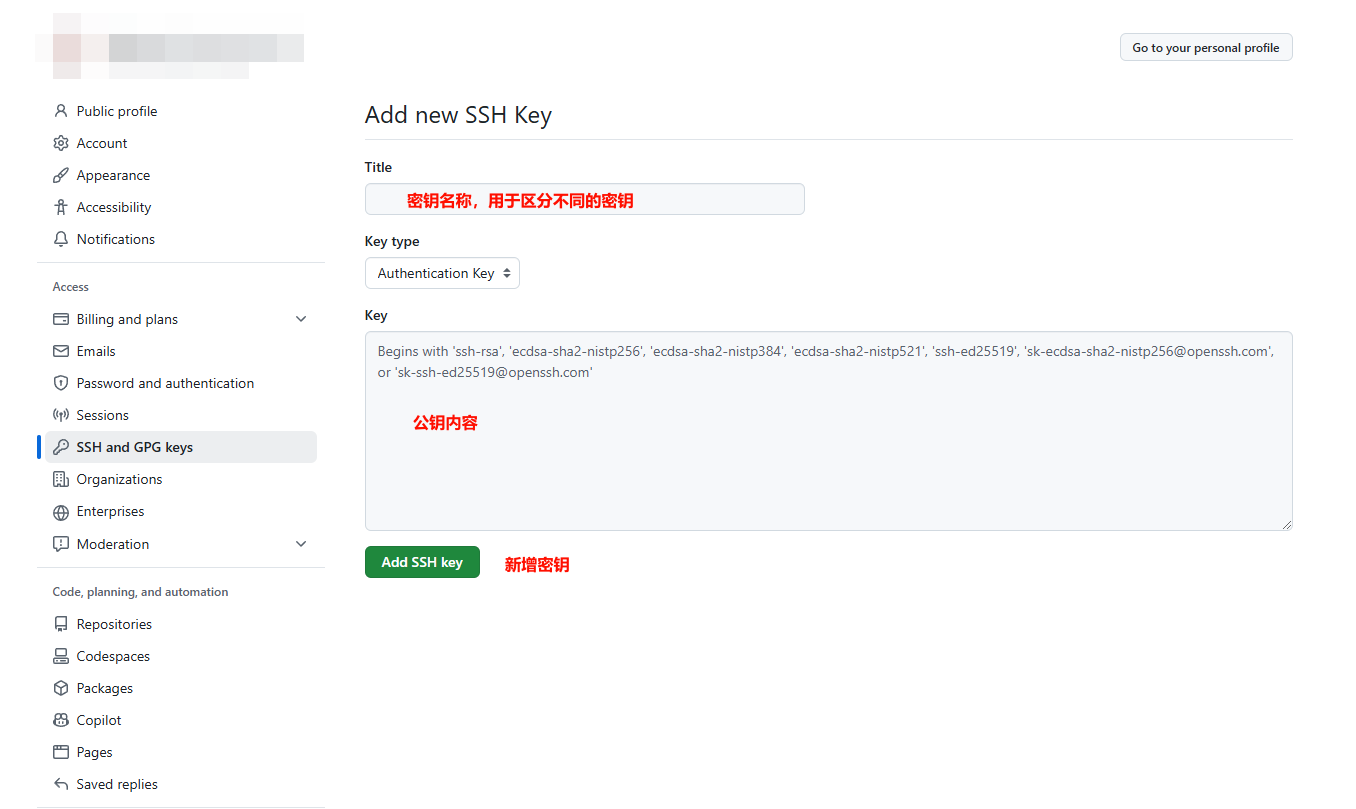
通过ssh来完成和GitHub的连接会更稳定可靠,HTTPS连接则非常考验网络环境。如果ssh也出现不稳定,可以通过配置文件使其连接至可用ip。在用户目录下的 .ssh 文件夹新建配置文件 config :
Host github.com
  Hostname 20.205.243.160
规范提交
采用 cz-git 来作为提交规范工具:
npm install -g cz-git commitizen
echo '{ "path": "cz-git", "$schema": "https://cdn.jsdelivr.net/gh/Zhengqbbb/cz-git@1.11.1/docs/public/schema/cz-git.json" }' > ~/.czrc
也可以采用普通的:
npm install -g commitizen cz-conventional-changelog
echo '{ "path": "cz-conventional-changelog" }' > ~/.czrc
都可以自定义提交规范,例如 cz-git 设置中英对照,编辑 ~/.czrc 文件以json格式添加配置:
{
  "path": "cz-git",
  "$schema": "https://cdn.jsdelivr.net/gh/Zhengqbbb/cz-git@1.11.1/docs/public/schema/cz-git.json",
  "alias": { "fd": "docs: fix typos" },
  "messages": {
    "type": "选择你要提交的类型 :",
    "scope": "选择一个提交范围(可选):",
    "customScope": "请输入自定义的提交范围 :",
    "subject": "填写简短精炼的变更描述 :\n",
    "body": "填写更加详细的变更描述(可选)。使用 '|' 换行 :\n",
    "breaking": "列举非兼容性重大的变更(可选)。使用 '|' 换行 :\n",
    "footerPrefixesSelect": "选择关联issue前缀(可选):",
    "customFooterPrefix": "输入自定义issue前缀 :",
    "footer": "列举关联issue (可选) 例如: #31, #I3244 :\n",
    "confirmCommit": "是否提交或修改commit ?"
  },
  "types": [
    { "value": "feat", "name": "feat:     新增功能 | A new feature" },
    { "value": "fix", "name": "fix:      修复缺陷 | A bug fix" },
    { "value": "docs", "name": "docs:     文档更新 | Documentation only changes" },
    { "value": "style", "name": "style:    代码格式 | Changes that do not affect the meaning of the code" },
    { "value": "refactor", "name": "refactor: 代码重构 | A code change that neither fixes a bug nor adds a feature" },
    { "value": "perf", "name": "perf:     性能提升 | A code change that improves performance" },
    { "value": "test", "name": "test:     测试相关 | Adding missing tests or correcting existing tests" },
    { "value": "build", "name": "build:    构建相关 | Changes that affect the build system or external dependencies" },
    { "value": "ci", "name": "ci:       持续集成 | Changes to our CI configuration files and scripts" },
    { "value": "chore", "name": "chore:    其他修改 | Other changes that do not modify src or test files" },
    { "value": "revert", "name": "revert:   回退代码 | Revert to a commit" }
  ],
  "useEmoji": false,
  "emojiAlign": "center",
  "useAI": false,
  "aiNumber": 1,
  "themeColorCode": "",
  "scopes": [],
  "allowCustomScopes": true,
  "allowEmptyScopes": true,
  "customScopesAlign": "bottom",
  "customScopesAlias": "custom",
  "emptyScopesAlias": "empty",
  "upperCaseSubject": false,
  "markBreakingChangeMode": false,
  "allowBreakingChanges": ["feat", "fix"],
  "breaklineNumber": 100,
  "breaklineChar": "|",
  "skipQuestions": [],
  "issuePrefixes": [{ "value": "closed", "name": "closed:   ISSUES has been processed" }],
  "customIssuePrefixAlign": "top",
  "emptyIssuePrefixAlias": "skip",
  "customIssuePrefixAlias": "custom",
  "allowCustomIssuePrefix": true,
  "allowEmptyIssuePrefix": true,
  "confirmColorize": true,
  "minSubjectLength": 0,
  "defaultBody": "",
  "defaultIssues": "",
  "defaultScope": "",
  "defaultSubject": ""
}
命令
remote
# 列出远程仓库
git remote -v
# 添加远程仓库,origin是仓库名,可以添加多个不同名的远程仓库
git remote add origin git@github.com:blackbox079/xxx.git
# 修改远程仓库
git remote set-url origin git@github.com:blackbox079/xxx.git
branch
# 重命名当前分支
git branch -M main
# 删除本地分支(未合并的分支不会执行删除)
git branch -d upstream
# 强制删除本地分支
git branch -D upstream
tag
# 给当前分支最新commit打标签
git tag -a v0.1.0 -m "first version"
# 给指定commit打标签(可跨分支)
git tag -a v1.0.0 5ef808c110b2431349501961048e8fe7c552dcc0 -m "Release version 1.0.0"
checkout
# 从当前分支新建分支
git checkout -b dev
# 从指定commit新建分支
git checkout -b upstream 1beb9aeac9e10ad5c00bee2cfb6dd1280ef773fa
# 切换分支
git checkout main
push
# 推送到指定分支
git push origin dev
# 推送指定标签
git push origin v0.1.0
# 推送所有标签
git push origin --tags
# 强制推送,会覆盖远程仓库分支
git push origin main -f
# 删除远程分支
git push origin --delete dev
# 删除远程标签
git push origin --delete v0.1.0
reset
# 撤销上一次commit(无痕版)
git reset --soft HEAD^
# 回退到指定commit(会生成新的commit)
git revert 90a3c8ef8612638d1c087a8e3fd0ff9a6d501514
场景
初始化仓库
# 初始化本地仓库
git init
# 重命名分支
git branch -M main
# 添加远程仓库地址
git remote add origin git@github.com:blackbox079/xxx.git
# 添加文件变动到暂存区
git add .
# 提交代码
git cz
# 推送到远程仓库
git push origin main
克隆远程仓库
git clone git@github.com:blackbox079/xxx.git合并代码
# 合并dev分支到当前分支(会生成commit)
git merge --no-ff dev -m "v0.0.1"
git merge --squash dev
提交代码
# 将所有改动添加到暂存区
git add .
# 提交
git cz
# 推送
git push origin dev